Flight Controller Guide 2026: F4 vs F7 vs H7 & How to Choose
Every drone needs a brain.
Without it, you're holding an expensive paperweight with spinning blades.
That brain is called a flight controller—but most people have no idea what it actually does. They see terms like F4, F7, H7, Pixhawk, and SpeedyBee, and their eyes glaze over.
Here's the truth: the flight controller is the single most important electronic component on your drone. It decides whether your quad flips on takeoff or flies like a dream. It determines if you can add GPS, run autonomous missions, or trust your return-to-home function.
And yet, most guides make it sound like rocket science.
So let's cut through the noise.
This guide will walk you through exactly what a flight controller does, how the different chips (F4 vs. F7 vs. H7) compare, which boards are worth your money (from budget under $50 to industrial-grade Pixhawk and Cube Orange), and how to set everything up—connecting ESCs, calibrating sensors, and flashing firmware.
No fluff. No jargon for the sake of jargon. Just what you actually need to know.
Let’s get to work.
What Is a Flight Controller on a Drone?
Let’s start simple.
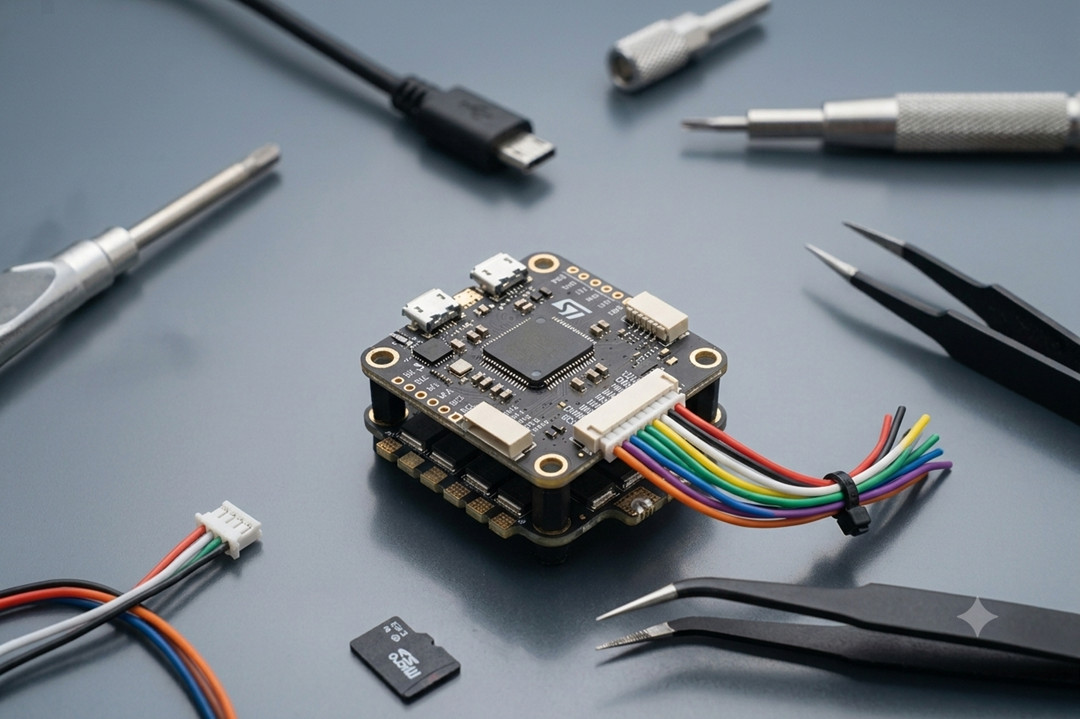
A flight controller is the circuit board inside your drone that keeps it in the air.
Think of it as the drone’s central nervous system. It reads sensors, listens to your remote control, calculates what the motors should do, and sends those commands—all in a fraction of a second.
Without a flight controller, your drone is just a pile of motors and carbon fiber. The moment you give it throttle, it will flip over and eat dirt. Because no human can manually balance four spinning propellers hundreds of times per second. That’s the flight controller’s job.
What Does a Flight Controller Do?
Four main things:
- Stabilizes flight – Gyroscopes and accelerometers tell the FC which way is up. If the drone tilts, the FC corrects it instantly.
- Processes your stick inputs – You push the right stick forward. The FC figures out which motors need to spin faster to move forward without losing balance.
- Navigates (if equipped with GPS) – Autonomous features like “return to home” or “hold position” are handled here.
- Talks to other components—The FC communicates with ESCs, receivers, GPS modules, payloads (cameras, LiDAR), and telemetry radios.
How Does a Flight Controller Work? (The PID Loop—Simplified)?
Inside every flight controller, there’s a loop running hundreds or even thousands of times per second. Engineers call it the PID loop. Here’s what happens in each cycle:
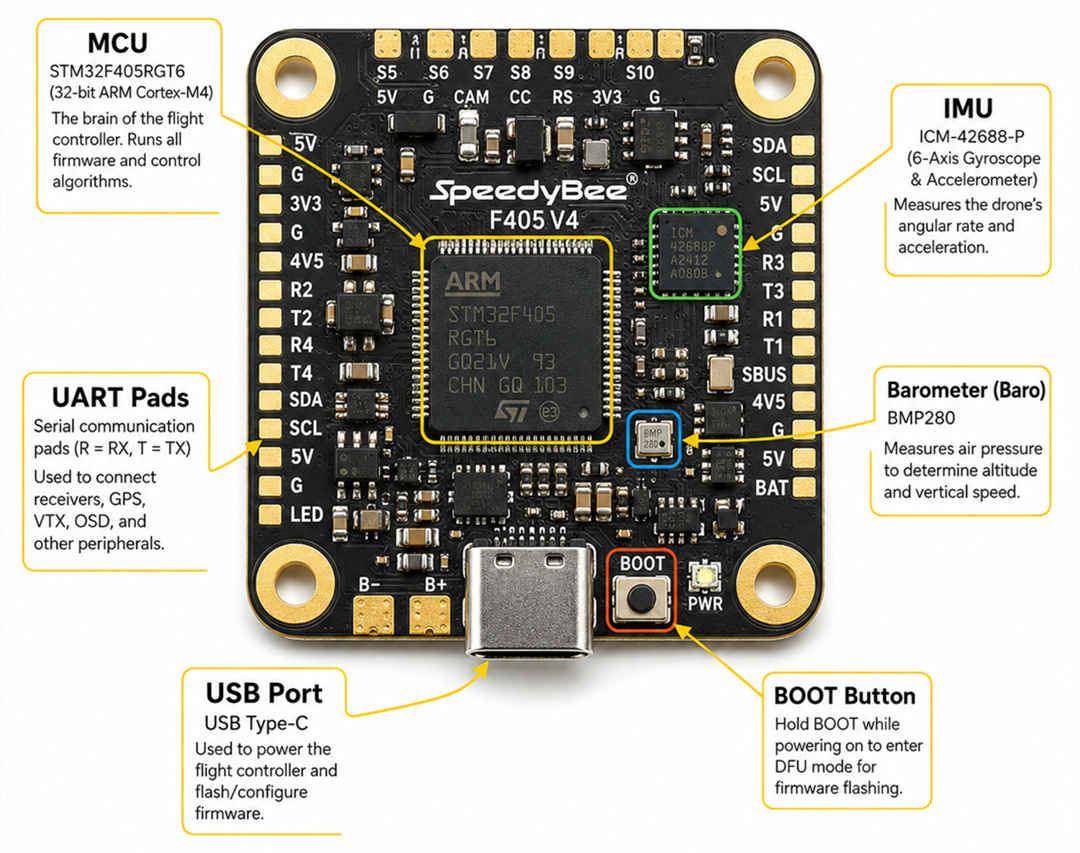
- Sense—The IMU (Inertial Measurement Unit) measures the drone’s current tilt, rotation speed, and acceleration.
- Compare—The FC compares where the drone is to where it should be (based on your stick inputs or mission plan).
- Correct—it calculates how much each motor needs to speed up or slow down.
- Output—It sends those commands to the ESCs, which adjust motor speeds.
This loop happens so fast that you never see the corrections. All you feel is a stable, responsive drone.
Key Components Inside a Flight Controller
A flight controller isn’t just a processor. It’s a small ecosystem of sensors and ports. Here’s what’s on board:
Common Flight Controller Firmware
The hardware is useless without software. Firmware is the operating system that runs on the FC. Different firmware for different jobs:
- Betaflight—The king of FPV racing and freestyle. Low latency, tons of tuning options.
- ArduPilot—For autonomous missions. Waypoints, return-to-home, survey patterns, payload control.
- INAV—A middle ground. GPS navigation with a simpler interface than ArduPilot.
- PX4—Another full-featured autopilot, popular in research and commercial.
The takeaway: A flight controller is the reason your drone doesn’t crash the second you take off. It’s a sensor‑packed computer that makes split‑second decisions, thousands of times per second, to keep you in the air.
Flight Controller vs. Autopilot—What's the Difference?
You'll see these two terms thrown around like they mean the same thing.
They don't. But the confusion is understandable—because sometimes the exact same hardware can act as either one.
Here's the cleanest way to think about it:
- Flight controller = the hardware board. The physical thing with chips, sensors, and solder pads.
- Autopilot = the software (firmware) that runs on that hardware, plus the features it enables.
A simple analogy
Imagine a laptop:
- The laptop is the hardware—like a flight controller board.
- Microsoft Word is the software—like autopilot firmware.
You can run different software on the same laptop. Same with flight controllers.
Real-world example
Take a SpeedyBee F405 board.
- If you flash Betaflight onto it, it's an FPV flight controller. No GPS waypoints, no autonomous missions. Just fast, responsive manual flight.
- If you flash ArduPilot onto the exact same board, it becomes an autopilot. Now it can fly waypoint missions, return home automatically, and survey a field without you touching the sticks.
Same hardware. Different job.
So what's an "autopilot system"?
When people say "Pixhawk autopilot", they usually mean the entire system: the Pixhawk flight controller board + ArduPilot or PX4 firmware + GPS + telemetry radios + ground control software. So:
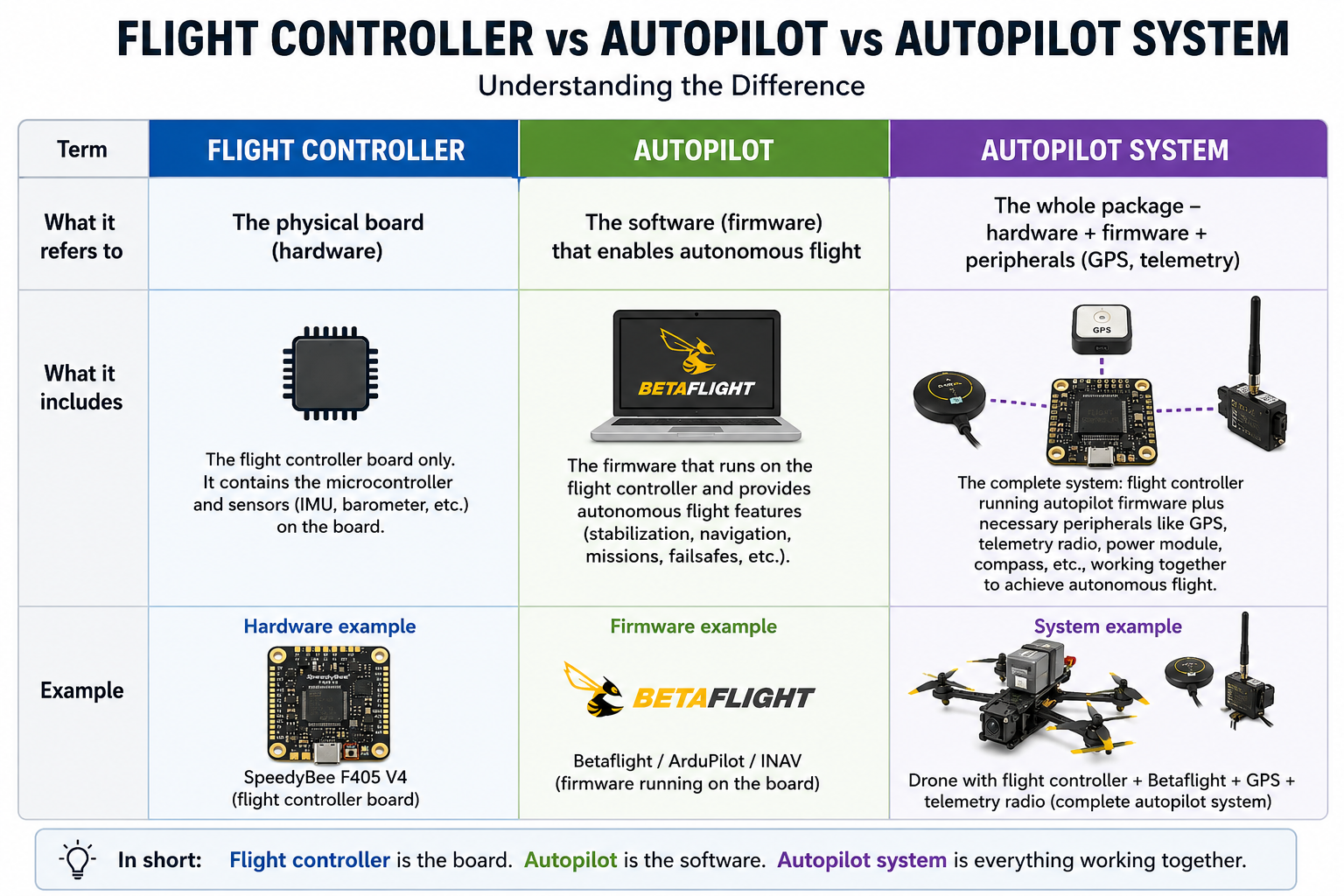
Why this matters to you
If you want to do racing or freestyle, you want a flight controller running Betaflight. An "autopilot" would just get in the way.
If your goal is mapping, surveying, or long-range autonomous flight, you’ll need an autopilot system. This means your flight controller must run ArduPilot or PX4 and be equipped with a GPS module. Such a setup transforms a standard drone into a true autonomous UAS, enabling it to navigate complex missions without pilot intervention.
Bottom line: Don't get hung up on the words. Focus on what the system can do. Can it fly a waypoint mission? Then it's an autopilot. Does it only respond to your sticks? That's just a flight controller.
Types of Flight Controllers (By Architecture and Use Case)
Not all flight controllers are created equal. Some are tiny boards meant for micro drones that fit in your palm. Others are full-featured autopilots designed for industrial UAVs that fly for hours.
Let’s break them down by how they’re built – and what they’re meant to do.
By Board Architecture (How It's Put Together)
1. All-in-One (AIO) Flight Controller
As the name says, everything is on one board: the flight controller, the ESC (Electronic Speed Controller), sometimes even the receiver and OSD.
- Pros: Lightweight, clean build, fewer wires.
- Cons: If one part fails (e.g., an ESC burns out), you replace the whole board.
- Best for: Tiny Whoops, micro drones, lightweight builds under 250g.
- Example: SpeedyBee F405 40A AIO, iFlight BLITZ ATF435.
2. Stack (FC + Separate ESC)
The most common setup for 3–5-inch FPV drones. A 30.5x30.5mm flight controller board stacks on top of a separate 4-in-1 ESC board using nylon standoffs.
- Pros: Modular – if the ESC dies, you replace only the ESC. Easier to troubleshoot.
- Cons: Slightly heavier and taller than AIO.
- Best for: FPV freestyle, racing, and most 5-inch builds.
- Example: SpeedyBee F405 V3 stack, Diatone Mamba stack.
3. Modular (FC + Carrier Board)
The flight controller is a small core module that plugs into a larger carrier board. The carrier board provides all the ports (USB, UART, CAN, etc.). Popular in Pixhawk systems.
- Pros: Extremely reliable. The core module is vibration-damped and can be swapped between carriers.
- Cons: Expensive. Larger footprint.
- Best for: Industrial UAVs, research platforms, and heavy-lift drones.
- Example: Pixhawk 6C, Cube Orange (the Cube plugs into a carrier board).
By Application (What You're Flying)
1. FPV Flight Controller
Designed for racing and freestyle. Priorities: low latency, high-speed processing, good filtering, and plenty of UARTs for peripherals like GPS or DJI O3.
- Typical firmware: Betaflight.
- Features: Onboard Blackbox logging, vibration dampening, DShot ESC support.
- Popular chips: F405, F722, H743.
2. UAV / Autonomous Flight Controller
Designed for waypoint navigation, surveying, and industrial applications. Priorities: sensor redundancy, GPS integration, telemetry, and reliability.
- Typical firmware: ArduPilot, PX4
- Features: Dual IMUs, barometer, magnetometer, CAN bus support, multiple GPS inputs.
- Popular boards: Pixhawk series, Cube Orange, Holybro Kakute H7 (running ArduPilot).
3. AIO (All-in-One) for Micro Drones
A subset of FPV, but worth its own category. These boards are tiny (20x20mm or 26x26mm) and combine FC + ESC into a single PCB.
- Best for: 1–3 inch drones, Toothpick class, Tiny Whoops.
- Popular: Happymodel AIO boards, SpeedyBee F405 20A/40A AIO.
By Motor Type (What Kind of Motors It Drives)
1. Brushed Flight Controller
Designed for small, inexpensive drones that use brushed DC motors (the kind that look like tiny silver cans with two wires).
- Pros: Cheap, simple.
- Cons: Brushed motors wear out quickly (50–100 flights). Low power.
- Best for: Beginner Tiny Whoops, toy-grade drones.
- Example: F3 EVO Brushed Flight Controller, BetaFPV brushed AIO boards.
2. Brushless Flight Controller
The standard for all modern drones (except the cheapest toys). Works with brushless motors – more efficient, more powerful, longer lasting.
- Pros: High performance, durable, efficient.
- Cons: More expensive than brushed.
- Best for: Everything from 2-inch micros to industrial UAVs.
By Size (Form Factor)
| Size | Mounting pattern | Best for |
| 30.5 x 30.5 mm (full-size) | Standard "stack" holes | 5-inch FPV, long-range, heavy lifts |
| 20 x 20 mm (mini) | Small square | 3–4 inch drones, lightweight builds |
| 26 x 26 mm (whoop) | Whoop-style mounting holes | Tiny Whoops, 1–2 inch micros |
| Custom / non-standard | Pixhawk, Cube, etc. | Industrial UAVs |
Mini flight controller is a loose term – usually refers to 20x20mm boards or compact AIOs.
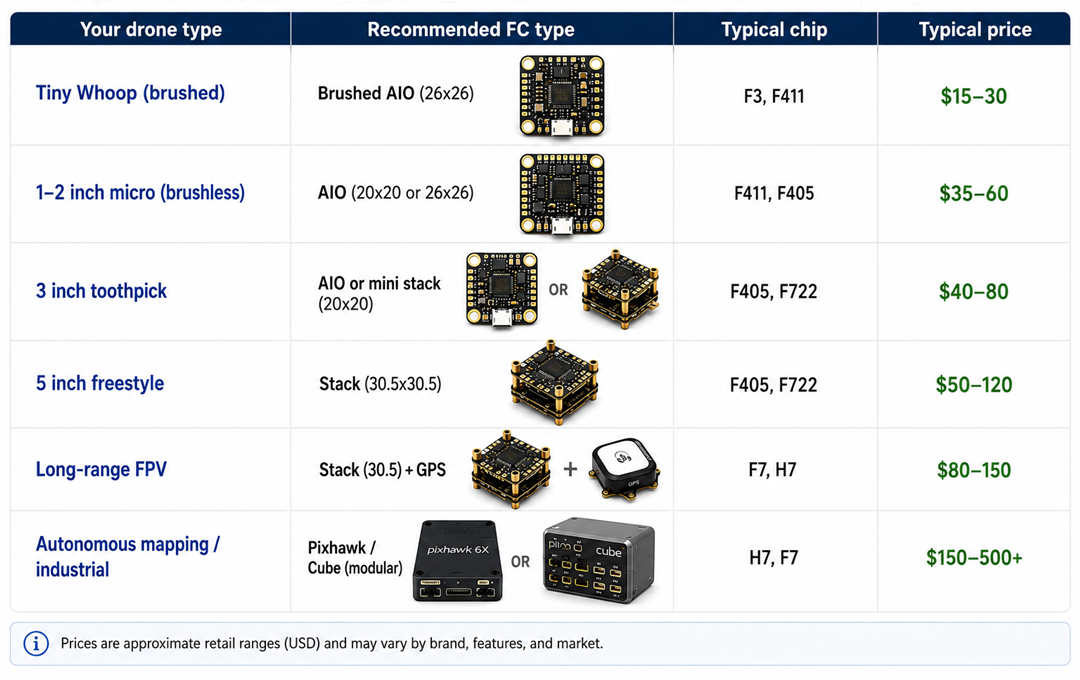
Quick Reference Table – Which Type Should You Choose?
A Note from JOUAV
At JOUAV, our UAV systems, including the CW-15 and CW-20E, are powered by our in-house developed modular industrial-grade autopilots rather than consumer-grade FPV systems.
Why? Because reliability matters when you're surveying 50km of pipeline. Consumer boards aren't built for vibration tolerance, temperature extremes, or the redundancy required for beyond-visual-line-of-sight (BVLOS) operations.
If you're just getting into drones, start with an F405 stack. If you're building something that needs to work every time, without fail, step up to industrial hardware.
F4 vs F7 vs H7 Flight Controllers – Which Processor Should You Choose?
Now we get to the heart of every flight controller: the microcontroller chip.
Almost all modern flight controllers are built around STM32 chips from STMicroelectronics. You'll see names like F405, F722, H743. The letter and number tell you the processor family – and that determines what the flight controller can handle.
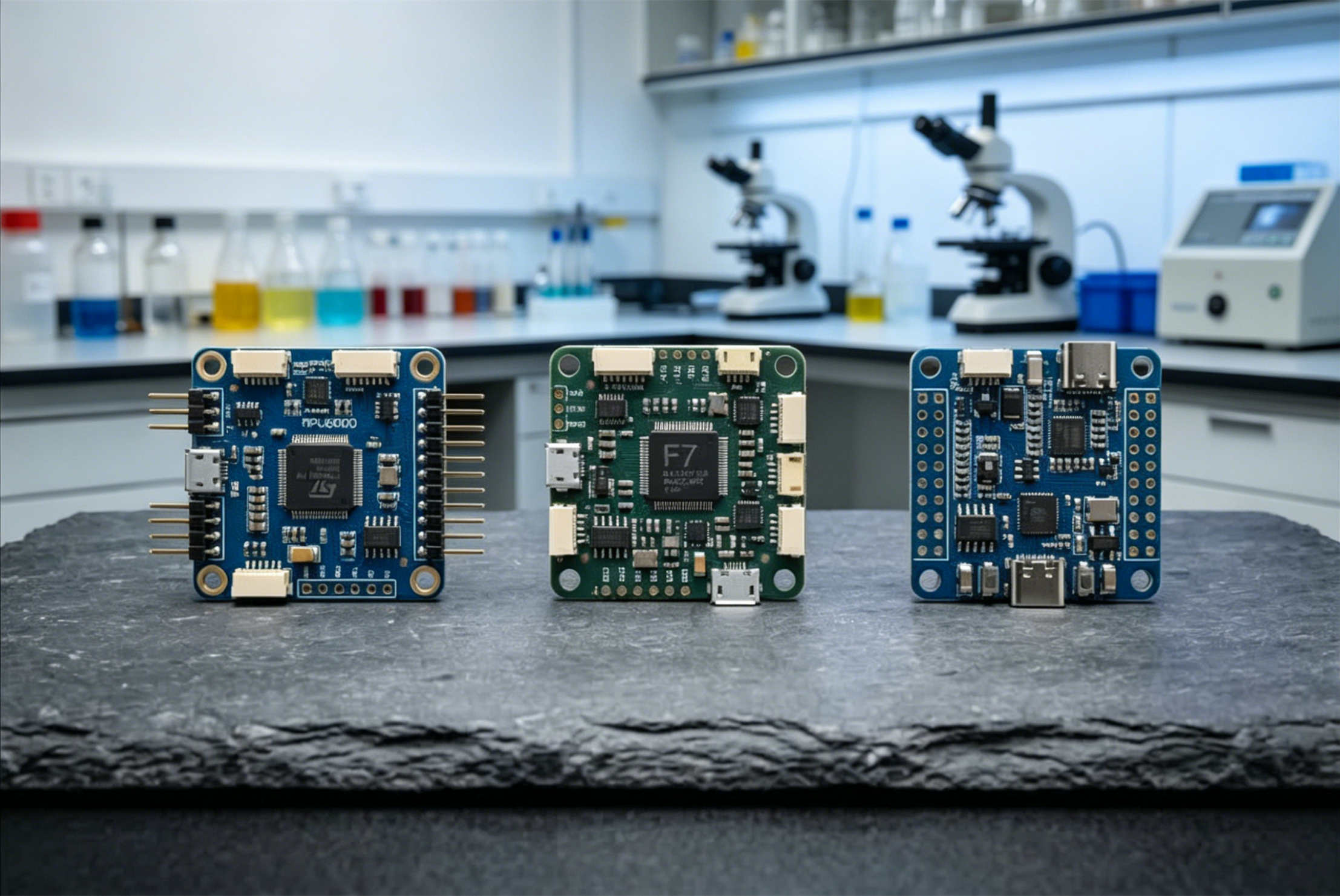
Here's what you actually need to know, without the engineering degree.
The STM32 Family – A Quick Overview
| Processor | Common FC Examples | Typical Use Case |
| F4 (e.g., STM32F405) | SpeedyBee F405, Mamba F405, Matek F405 | Everyday FPV freestyle, racing, basic builds |
| F7 (e.g., STM32F722, F745) | SpeedyBee F7, iFlight F7, Matek F722 | FPV with GPS, more accessories, long-range |
| H7 (e.g., STM32H743, H750) | Pixhawk 6C, Cube Orange, Matek H743 | Heavy autonomous navigation, industrial, future-proofing |
What Actually Improves with Higher Chips?
More than just speed. Here's a breakdown:
| Feature | F4 (F405) | F7 (F722) | H7 (H743) |
| Processor speed | 168 MHz | 216 MHz | 480 MHz |
| Floating-point unit | Yes (single precision) | Yes (double precision) | Yes (double precision) |
| RAM | 192 KB | 256 KB | 1 MB |
| Flash storage | 1 MB | 512 KB (some F7 have 1MB) | 2 MB |
| UARTs (serial ports) | 3–5 typically | 5–7 typically | 6–8 typically |
| Hardware timers | Good | Better | Best (more PWM outputs) |
| USB speed | Full Speed | Full Speed | High Speed (faster logs) |
Real talk: For basic flying, you won't feel the difference between F4 and F7. The improvements show up when you add peripherals – GPS, compass, multiple UART devices, OSD, Blackbox logging at high rates.
F4 Flight Controller – The Reliable Workhorse
The STM32F405 is the most popular flight controller chip in history. It's mature, stable, and well-supported by every firmware (Betaflight, ArduPilot, INAV).
- Pros: Cheap ($20–50 for a good F4 board), plenty of power for 95% of FPV pilots, huge community support.
- Cons: Fewer UARTs than F7 or H7. If you want GPS, receiver, VTX control, compass, and telemetry all at once, you might run out of ports.
- Verdict: Perfect for a first build or a pure freestyle quad.
Common F4 boards you'll see: F405 (most common), F411 (smaller, fewer UARTs, common in micro drones), F427 (higher spec, rare).
F7 Flight Controller – The Flexible All-Rounder
F7 chips (especially STM32F722) are the upgrade for pilots who want more room to grow. Not because they're dramatically faster – but because they have more UARTs and better resource allocation.
- Pros: More serial ports for GPS, DJI O3, Bluetooth modules, etc. Handles complex configurations without stuttering. Future firmware features will likely stay compatible longer.
- Cons: Slightly more expensive than F4 ($60–120). Overkill for a basic quad.
- Verdict: Choose F7 if you plan to add GPS, run digital video, or build a long-range cruiser.
Common F7 boards: F722 (most common), F745 (older, less common).
H7 Flight Controller – Future-Proof Performance
H7 is the heavyweight. STM32H743 runs at 480 MHz – nearly three times faster than F4. It also has much more flash and RAM, plus high-speed USB for quick log downloads.
- Pros: Can run the most demanding firmware (ArduPilot with full features). Handles dual GPS, IMU redundancy, heavy logging. Will stay relevant for years.
- Cons: Expensive ($80–250+). Most people don't need this power.
- Verdict: Great for autonomous UAVs, research platforms, or if you simply want the best and don't mind paying.
Common H7 boards: H743, H750 (less flash, but still powerful).
Which Flight Controller Is Best for Your Quadcopter?
Ask yourself three questions:
- What firmware will I run? Betaflight runs fine on F4. ArduPilot with full features likes F7 or H7 better.
- How many peripherals? Just a receiver and VTX? F4 is fine. Adding GPS, compass, airspeed sensor, telemetry radio, and a fancy OSD? Get F7 or H7.
- What's your budget? F4 saves money for batteries and props. F7/H7 spend more upfront but may save an upgrade later.
Quick decision chart:
| If you want to… | Recommended chip | Example FC |
| Build a cheap freestyle quad on a budget | F4 (F405) | SpeedyBee F405 V3 |
| Build a 5-inch with GPS and DJI O3 | F7 (F722) | SpeedyBee F7 V3 |
| Build a long-range autonomous mapping drone | H7 (H743) | H7 (H743) Holybro Kakute H7 or Pixhawk 6C |
| Get into Tiny Whoops / micro drones | F4 (F411) | Happymodel AIO boards |
What About F3, F1, and Other Old Chips?
You might see F3 (e.g., F303) or even older F1 chips in bargain bins or old tutorials. Avoid them. They're no longer supported by modern Betaflight or ArduPilot. The same goes for KK2.1.5 and CC3D – they're museum pieces now. Fun to look at, not to fly.
One Last Reality Check
Remember: the chip is not the only thing that matters. A well-designed F4 board with good IMU, clean power delivery, and quality components will outperform a cheap, noisy H7 board.
Brand, layout, and component quality matter as much as the processor. Stick with trusted names: SpeedyBee, Holybro, Matek, Diatone, and iFlight.
Now, let's look at some of the most popular flight controller boards you'll actually find on the market – from budget to premium.
Best Flight Controllers — Top Recommendations by Use Case
Alright, let’s get practical. You know what a flight controller does and how to pick the right processor. Now here are the actual boards you should be looking at in 2026.
I’ve organized this by how you actually fly. Skip to your use case and ignore the rest.
Best FPV Racing / Freestyle Flight Controllers
If you fly low, fast, and through gaps, you don’t need GPS, you don’t need a barometer, and you definitely don’t need triple-redundant IMUs. What you need is low latency, a clean signal, and hardware that won’t fail mid-powerloop.
For most FPV pilots, an F4 board is still enough and flies very well. For most 5-inch freestyle builds with just a receiver, VTX control, and basic telemetry, F4 has enough CPU performance for smooth flying. It’s mature, well-supported, and strong value.
But F7 has a place, too. The benefit isn’t really raw speed in flight feel — that jump is usually small. Where F7 shines is flexibility: more serial ports (UARTs), cleaner resource mapping, and less compromise when adding GPS, external receivers, or extra sensors later. If you think you might add a GPS module down the line for long-range flights, F7 is a sensible buffer.
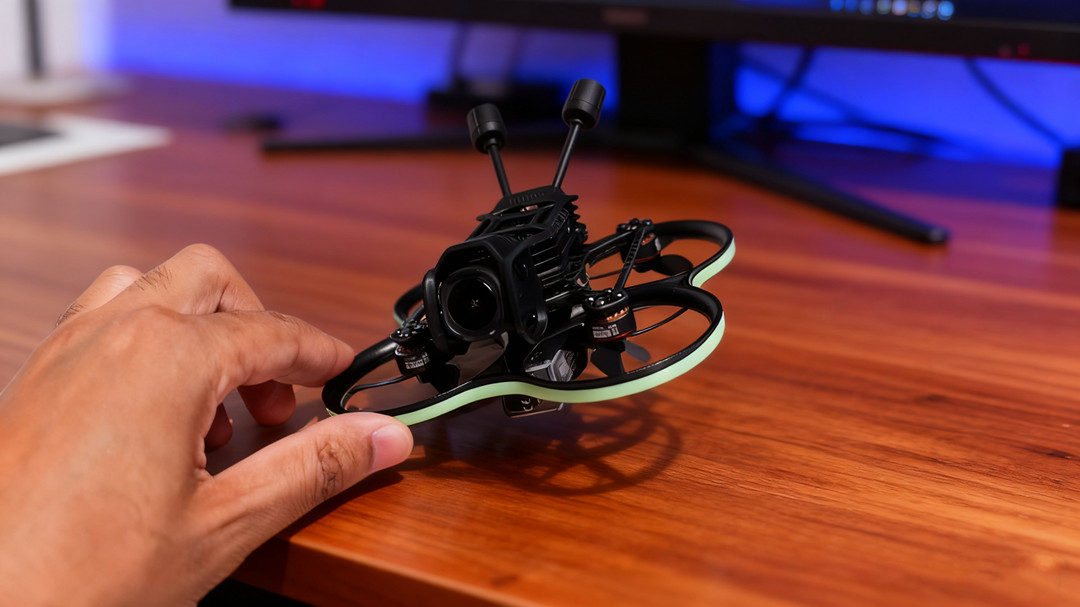
Here are the best options in 2026:
| Model | Processor | Form Factor | Why Recommended | Price (approx.) |
| SpeedyBee F405 V4 Stack | STM32F405 (168MHz, 1MB flash) | 30.5mm | Best overall value; Bluetooth/WiFi wireless config via mobile app; future-proof 1MB flash memory; plug-and-play digital FPV compatibility (DJI O3, Walksnail) | ~$65–75 (FC+ESC stack) |
| SpeedyBee F405 Mini Stack | STM32F405 | 20mm | Same F405 processor in a smaller package; excellent for ultralight 3–4 inch builds and lightweight 5-inch builds | ~$60 |
| SpeedyBee F7 V3 Stack | STM32F722 (216MHz, 512KB flash) | 30.5mm | Premium SpeedyBee offering with faster processor; onboard BMP280 barometer for altitude hold; 8 motor outputs (X8 / octocopter support); wireless Bluetooth/WiFi config | ~$120 (FC+ESC stack) |
| iFlight Beast F7 45A AIO | STM32F7 | 30.5mm AIO | ll-in-one board with built-in 45A ESC; onboard barometer; DJI plug-and-play; lightweight (8g); easy setup for mini quads | ~$100–120 |
| Diatone Mamba MK4 H743 V2 | STM32H743 | 30.5mm | Dual ICM-42688-P gyroscopes for exceptional noise filtering; top performance for pro racing builds | ~$80–100 |
| Matek F405 Mini | STM32F405 | 20mm | Packed with 32K gyro, 32M blackbox, Betaflight OSD; 16K PID loop frequency; perfect for mini racing quads | ~$40–50 |
Winner for most people: SpeedyBee F405 V4 stack.
The F405 V4 is widely considered the best value stack in 2026. It has a faster processor (168MHz) than many F7 alternatives and — critically — 1MB of flash memory. That’s twice the memory of many F722 boards (which only have 512KB), making the F405 more future-proof as Betaflight firmware continues to grow in size. If you’re building your first or second quad, buy this one and spend the saved budget on batteries, props, and practice time.
Best GPS / Long‑Range FPV Flight Controllers
For long-range exploration — mountain surfing, river chasing, or just flying far enough to lose video signal — you need GPS. And GPS needs UARTs.
This is exactly where F7 and H7 processors earn their keep. Long-range aircraft with GPS navigation, return logic, logging, and multiple serial devices benefit most from the extra processing headroom and generous connectivity of F7 and H7 boards.
| Model | Processor | Key Features | Why Recommended | Price |
| SpeedyBee F7 V3 Stack | STM32F722 | Onboard BMP280 barometer; 8 motor outputs (X8 support); Bluetooth/WiFi; 50A ESC | Powerful, flexible, and easy to configure wirelessly. Supports GPS, telemetry, and all the peripherals a long-range build needs. | ~$120 stack |
| Holybro Kakute H7 v1.3 | STM32H743 (480MHz) | Built-in Bluetooth; 6x UARTs; MPU6000 IMU; BMP280 barometer; 2S–8S input; 9V/3A BEC for DJI O3 | One of the most feature-rich FPV FCs available. H7 processing power, plug-and-play DJI HD port, and wireless tuning via SpeedyBee app. | ~$80–100 |
| Matek F405‑WTE | STM32F405 | Integrated ESP32 module (can run ELRS receiver or WiFi telemetry); ArduPilot/INAV support; wing-focused layout | Popular choice for fixed-wing long-range flyers. Solid reliability, good documentation. | ~$70–90 |
| Matek H743‑Wing V3 | STM32H743 (480MHz) | Dual IMUs (ICM42688-P + ICM42605); 7x UARTs; CAN bus; 13 PWM outputs; DPS310 baro; 8–36V input | Wing-specific layout with airspeed sensor support, dual BECs, and high-precision current sensing. The gold standard for serious long-range fixed-wing builds. ArduPilot-ready out of the box. | ~$95–110 |
Note on F405 vs. F722 memory for GPS builds: The SpeedyBee F405 V4 has 1MB flash; the SpeedyBee F7 V3 has an F722 processor with only 512KB flash. Less memory may restrict the number of features you can enable in INAV or ArduPilot as firmware keeps expanding.
For long-range builds where you might run GPS, telemetry, OSD, logging, and more simultaneously, the F405’s 1MB flash is a subtle but real advantage over some F7 boards.
Best Industrial / Commercial Autopilots (ArduPilot / PX4)
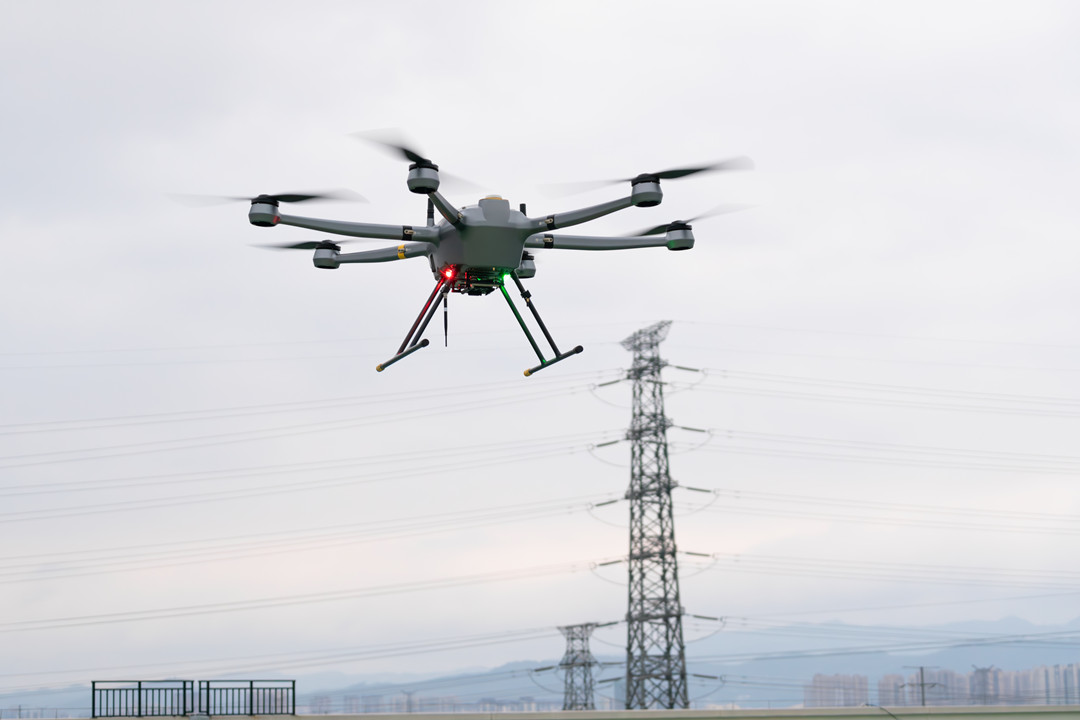
This is where we stop playing games. Industrial UAVs — mapping, inspection, agriculture, delivery — need reliability, not just speed.
These systems typically run ArduPilot or PX4 firmware. They need redundant sensors, CAN bus for payload communication, RTK GPS support, and the ability to survive a component failure without crashing.
If you are building a commercial drone or a research platform that carries expensive payloads (LiDAR, multispectral cameras, thermal sensors), do not cheap out here.
| Model | Processor | Key Features | Why Recommended | Price Range |
| Holybro Pixhawk 6X / 6X Pro | STM32H753 | Triple-redundant IMUs; dual barometers; 5x UART; CAN; I2C; SPI; Ethernet support; RTK-ready | The modern gold standard for PX4 and ArduPilot open-source autopilots. Rock-solid performance, extensive peripheral support, and great documentation. Half the price of Cube Orange, “almost as good”. | ~$350–500 |
| Holybro Pixhawk 6C (Mini) | STM32H743 | Smaller form factor; similar H7 processing; fewer ports; retains triple IMU redundancy | Excellent for compact industrial builds and smaller commercial UAVs. Works fine for camera drones with M9N GPS and telemetry radio. | ~$200–300 |
| Cube Orange+ / Cube Yellow | STM32H743 | Triple-redundant IMUs with vibration isolation; temperature‑controlled IMU; modular 80-pin connector; industrial-grade build quality | The premium choice for high-reliability industrial UAVs and research platforms. “Honda vs Toyota” compared to Pixhawk 6X Pro. Commonly used with Here 4 or F9P GPS for cm-level precision. | ~$450–800 |
| CUAV V5+ / X7+ | F7 / H7 | Triple redundancy; industrial-grade components; extensive CAN bus support; ArduPilot/PX4 compatible | Solid alternative to Pixhawk with slightly different I/O configuration. Used in commercial VTOL and fixed-wing projects. | ~$300–600 |
| Matek H743 (Series) | STM32H743 (480MHz) | 2MB flash; 7x UARTs; CAN bus; dual IMUs; excellent value | For budget-conscious industrial or R&D builds where Cube/Pixhawk are too expensive. “Matek H7 controllers tend to have enough flash to use most of the ardupilot functionality”. | Available in Wing (fixed-wing, $107) and WLITE (general, $90) variants. |
| CUAV V5 Nano | F7 | Ultra-compact; retains sensor redundancy | Good for very small autonomous UAVs where weight is critical. | ~$200–300 |
Quick comparison — Pixhawk 6X vs Cube Orange+:
Both are excellent. The Pixhawk 6X is roughly half the price of the Cube Orange+ and offers H7 processing and triple-redundant IMUs. The Cube Orange+ has a more modular ecosystem and is often preferred for high-reliability applications. As one community member put it, “It’s really a Honda vs Toyota kind of fight. They are both capable units”.
Best Micro / Tiny Whoop Flight Controllers (1S–2S)
Tiny Whoops and micro drones are a different world. Weight is everything. The best boards for these builds are AIOs (All-in-One) — they combine the flight controller, ESC, and often the receiver and VTX on a single tiny PCB.
| Model | Form Factor | Specs | Why Recommended | Price |
| HappyModel X12 AIO | 25.5mm AIO | 5A ESCs; built-in ExpressLRS 2.4GHz receiver; 400mW VTX | One of the most popular AIOs for 1S–2S Tiny Whoops. Everything integrated. | ~$65–80 |
| Flywoo GOKU F405 HD 1S‑2S AIO | 25.5mm AIO | F405 processor; designed for digital FPV (Walksnail, DJI O3, HDZero) | Great for HD micro builds. No analog OSD chip, so not for analog builds. | ~$70–90 |
| BetaFPV F4 1S‑2S AIO | 25.5mm AIO | Standard F4 AIO; widely available | The baseline recommendation for most Tiny Whoop builds. Works, cheap, replaceable. | ~$40–50 |
| NewBeeDrone HummingBird RaceSpec V2 AIO | Whoop AIO | ELRS 2.4GHz built-in; 25–400mW VTX | Premium Tiny Whoop AIO with good build quality and integrated VTX. | ~$70–85 |
| Matrix 5IN1 II FC (Air75 II) | Whoop integrated | 12A ESCs; 3-point mounting system for impact durability | Found in the Air75 II bind‑and‑fly. Designed to reduce core component damage by up to 80% during crashes. | Part of BNF |
Best Budget / Cheapest Flight Controllers for Drone
Not everyone needs a $200 stack. For budget builds, educational projects, or just learning to solder and configure Betaflight, cheaper options exist.
Here is the reality of 2026:
- Under $25: Generic F4 flight controller boards from AliExpress or Banggood. No ESC included. You will need to source ESCs separately and do all the soldering yourself. These are functional but not recommended for anything you care about.
- Under $50: SpeedyBee F405 Mini stack (FC + ESC) at around $60 is the closest mainstream option. True sub‑$50 complete stacks are getting rare.
- Cheapest possible DIY: An ESP32‑based flight controller (e.g., madflight project) can be built for under $15 using an ESP32 dev board and an MPU6050 IMU module.
| Model | Type | Price | Who It‘s For |
| Generic F4 “Omnibus” clone | FC only (no ESC) | ~$20–30 | Experimenters; people who already own ESCs; learning how Betaflight works |
| SpeedyBee F405 Mini stack | FC + 20mm ESC | ~$60 | Budget 3‑inch or small 5-inch build; best value at this price point |
| F3 EVO Brushed FC | Brushed FC | ~$15–20 (obsolete/discontinued) | Vintage micro brushed builds only; not recommended for new projects |
| ESP32 + MPU6050 DIY | DIY FC | ~$10–15 (components only) | Students, hobbyists, people who want to understand how flight controllers work at a firmware level |
Important warning on cheap FCs: The cheapest flight controllers often have poor quality control, bad documentation, or both. If you are building a drone for a class or a serious project, spend the extra $20–30 for a SpeedyBee or Matek. Your future self — trying to debug random yaw twitches — will thank you.
How to Choose a Flight Controller — A Practical Decision Framework
By now you’ve seen dozens of model names, processor numbers, and price tags. It’s easy to get stuck.
So let’s flip this around. Instead of starting with specs, start with what you actually want to do.
This framework has eight questions. Answer them honestly, and you’ll land on the right type of flight controller — often down to just two or three models.
Step 1 — What Is Your Main Use Case?
This is the most important question. Everything else flows from it.
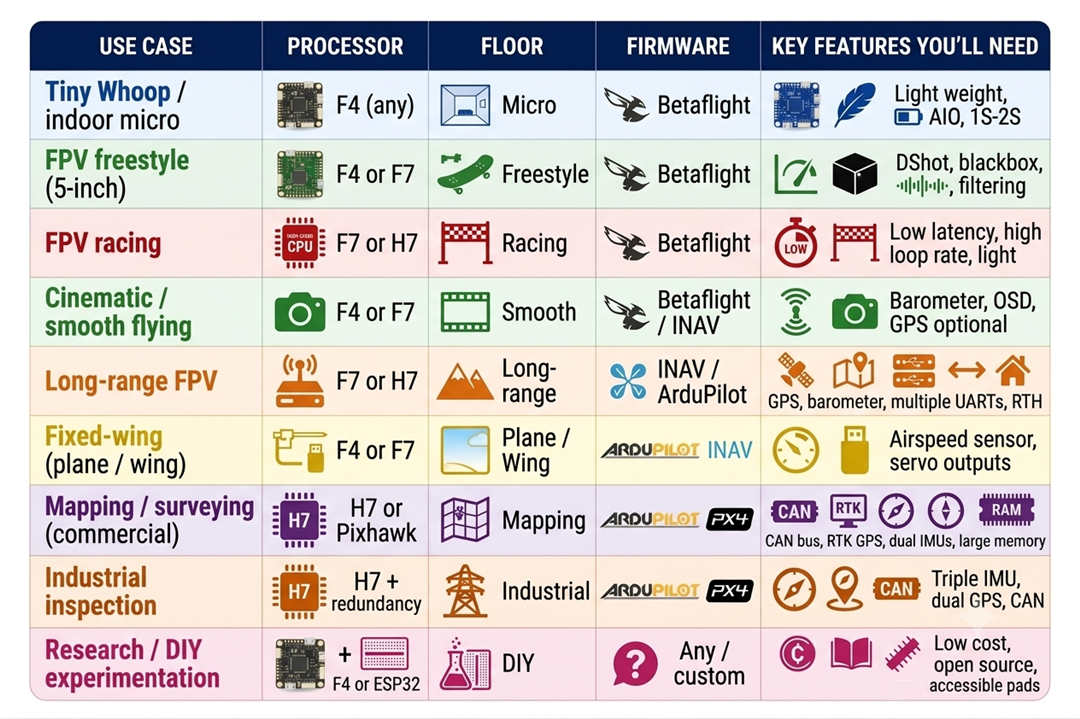
Action: Pick one row. That’s your starting filter.
Step 2 — How Much Flight Time Do You Need?
Flight time isn’t just about batteries. The FC affects efficiency indirectly (filtering, motor sync), but the main constraint is size and weight.
- Under 3 minutes → racing Tiny Whoop. Look for ultra‑light AIO boards.
- 3–5 minutes → standard freestyle 5‑inch. Most F4/F7 stacks work.
- 5–10 minutes → cruising or mild freestyle. Consider a board with good power efficiency (F405 is fine).
- 10–30 minutes → long‑range or fixed‑wing. Need GPS, baro, and possibly airspeed sensor.
- 30+ minutes → industrial VTOL or mapping rig. You’re in Pixhawk/Cube territory with redundant sensors.
Action: Don’t buy an industrial H7 board for 5‑minute freestyle. Overkill and heavy.
Step 3 — How Many Peripherals Will You Connect? (UART Count)
This is where beginners make mistakes.
Each of these devices uses one UART (serial port):
- Receiver (ELRS, Crossfire, SBUS) → 1 UART
- GPS module → 1 UART (or 2 if you want both RX and TX for telemetry)
- Telemetry radio (e.g., 3DR, ExpressLRS backpack) → 1 UART
- VTX control (SmartAudio or Tramp) → 1 UART (if using analog or certain digital)
- Onboard computer / companion computer (Raspberry Pi, ESP32) → 1 UART
- Airspeed sensor (fixed‑wing) → 1 UART
- External compass (if not onboard or in GPS) → 1 UART (I2C, not UART, but still counts as a connection)
Count yours:
| Peripherals | Minimum UARTs | Recommended FC class |
| Only receiver + VTX control | 2 | F4 (4‑6 UARTs) |
| + GPS | 3 | F4 (still fine) |
| + GPS + telemetry | 4 | F7 (more headroom) |
| + GPS + telemetry + airspeed | 5 | F7 or H7 |
| + all the above + companion computer | 6+ | H7 or Pixhawk |
Action: Add up your planned peripherals. Add one spare. That’s your UART target.
Real example: A long‑range FPV build with ELRS receiver (1), GPS (1), analog VTX control (1), and a telemetry radio (1) = 4 UARTs. An F7 board with 6 UARTs is perfect. An F4 with 4 UARTs would work but leave no room for expansion.
Step 4 — Do You Need GPS / Autonomous Features?
If you answer yes to any of these, you need GPS support:
- “I want return‑to‑home on failsafe”
- “I want to fly waypoint missions”
- “I want position hold / loiter”
- “I fly over water or far mountains”
GPS requirements:
- FC must have a free UART for the GPS module.
- FC should have a barometer (most do, but double‑check).
- For ArduPilot/PX4, the FC needs to be on their supported hardware list (Pixhawk, Cube, Matek, etc.)
Action: If you need GPS, avoid “race” boards that omit the barometer and use only 2 UARTs. Look for F7 or H7 with baro.
Step 5 — What’s Your Soldering Skill Level?
Be honest with yourself.
Beginner (first build):
- Avoid boards with tiny pads (1mm pitch).
- Look for “plug‑and‑play” stacks with pre‑soldered harnesses (SpeedyBee, Diatone).
- Avoid AIO boards that cram everything into a tiny square.
Intermediate (can solder 20‑gauge wire): - Most 30.5mm stacks are fine.
- You can handle through‑hole ESC pads and small signal pads.
Advanced (comfortable with 0.5mm pitch QFN chips): - You can repair broken pads, rework USB ports, etc.
- AIO boards and micro boards are okay.
Action: If you’re new, spend $10 more for a stack with labeled pads, a wiring diagram, and a harness. The generic “no‑name” boards from AliExpress have terrible documentation.
Step 6 — What Battery Voltage Will You Use?
The FC must support your battery’s input voltage.
| Battery | Voltage range | FC requirement |
| 1S | 3.7–4.2V | FC must have an onboard regulator or be 1S‑specific |
| 2S | 7.4–8.4V | Most FCs support 2S–6S |
| 3S–6S | 11.1–25.2V | Standard for 5‑inch builds |
| 6S–8S | 25.2–33.6V | Need FC rated for 8S (some F7/H7 boards) |
| 12S+ | 50V+ | Industrial FCs only (e.g., CUAV, Cube) |
Action: Check the FC’s specs for “input voltage” or “VIN”. Most F4/F7 boards handle 2S–6S. If you fly 1S, buy a board specifically made for 1S (like BetaFPV F4 1S AIO).
Step 7 — What Form Factor Fits Your Frame?
Measure your frame’s mounting holes before buying.
| Form factor | Mounting pattern | Typical use |
| 30.5×30.5mm | 4 holes, 30.5mm apart | 5‑inch freestyle, racing, most standard builds |
| 20×20mm | 4 holes, 20mm apart 3‑4‑inch, lightweight | 5‑inch |
| 25.5×25.5mm | 4 holes, 25.5mm apart | Whoop, toothpick, micro |
| AIO (no standard pattern) | Built into frame or custom | Tiny Whoops, pre‑built BNF |
Action: Check your frame’s product page for “FC mounting pattern”. Buy a stack that matches. Adapters exist but add weight and complexity.
Step 8 — What’s Your Real Budget?
Not “what’s the cheapest?” but “what am I comfortable losing in a crash?”
| Budget | What you can get | Example |
| Under $30 | Used or generic F4 (FC only, no ESC) | Risk of no support, poor documentation |
| $40–70 | Decent F4 stack (FC + ESC) | SpeedyBee F405 Mini |
| $70–120 | Good F4/F7 stack with Bluetooth | SpeedyBee F405 V4, F7 V3 |
| $120–200 | Premium F7/H7 stack + GPS | Holybro Kakute H7, Matek H743‑Wing |
| $200–400 | Entry‑level Pixhawk | Pixhawk 6C, CUAV V5 Nano |
| $400+ | Industrial autopilot | Pixhawk 6X, Cube Orange+ |
Action: Match your budget to your risk. A $40 stack is fine for a $200 drone you crash often. A $400 autopilot is cheap if it protects a $15,000 payload.
Decision Matrix — Put It All Together
Here’s a one‑page cheat sheet. Find your row.
| Your profile | Processor | Firmware | Form Factor | Example boards | Approx. cost |
| First build, 5‑inch freestyle | F4 | Betaflight | 30.5mm stack | SpeedyBee F405 V4 | $65–80 |
| Tiny Whoop indoor | F4 AIO | Betaflight | 25.5mm AIO | HappyModel X12, BetaFPV F4 | $40–60 |
| Long‑range GPS (analog) | F7 | INAV | 30.5mm stack + GPS | SpeedyBee F7 V3, Holybro Kakute H7 | $120–180 |
| Long‑range GPS (digital) | F7 / H7 | INAV / ArduPilot | 30.5mm + GPS + baro | Same as above | $140–200 |
| Fixed‑wing long‑range | H7 | ArduPilot | Wing‑specific | Matek H743‑Wing V3 | $95–120 |
| Commercial mapping | H7 (Pixhawk) | ArduPilot / PX4 | Pixhawk standard | Holybro Pixhawk 6C | $250–350 |
| Professional industrial | H7 (redundant) | ArduPilot / PX4 | Pixhawk / Cube | Pixhawk 6X, Cube Orange+ | $450–800 |
| DIY / learn coding | F4 or ESP32 | Custom | Any cheap | Generic F4, ESP32 dev board | $10–30 |
Quick “Don’t Buy” Checklist
Avoid these common traps:
- Buying an F7 board with only 512KB flash when an F4 with 1MB flash is cheaper (SpeedyBee F405 vs. some F722).
- Buying a board with no barometer if you ever want altitude hold or GPS rescue.
- Buying a 20×20mm stack for a 5‑inch freestyle frame that expects 30.5mm (needs adapters).
- Buying the cheapest ESC‑FC stack from an unknown brand (fire risk, no documentation).
- Buying an industrial Pixhawk for your first freestyle quad (heavy, overkill, requires complex setup).
Flight Controller Price — How Much Should You Pay?
Let’s be real: price is often the first thing you look at. But the cheapest board can end up costing you more in time, frustration, and crashed drones. The most expensive one might be overkill for a backyard freestyle build.
So how much should you actually spend?
Here’s a straightforward breakdown by use case and experience level.
Price Tiers at a Glance (2026)
| Tier | Price Range | What You Get | Who It‘s For |
| Entry / Micro AIO | $15 – $40 | Basic F4 AIO board, often with built‑in ESC and receiver; 1S–2S support; limited UARTs | Tiny Whoop beginners, micro drone builders, ultra‑tight budget |
| Budget FPV (FC only) | $20 – $40 | Generic F4 flight controller (no ESC); basic features; manual setup required | Experienced builders with spare ESCs; educational projects |
| Mid‑Range FPV Stack | $40 – $120 | F4 or F7 stack (FC + 4‑in‑1 ESC); Bluetooth/WiFi config; Betaflight‑optimized; good UART count | Most FPV freestyle and racing pilots; best value |
| Advanced FPV / GPS | $80 – $150 | F7 or H7 processor; barometer; 6+ UARTs; high‑amp ESC (50A+); often with blackbox | Long‑range FPV, GPS rescue, INAV builds, serious hobbyists |
| Entry‑Level Industrial (Pixhawk‑class) | $200 – $350 | H7 processor; triple IMU (sometimes); ArduPilot/PX4 ready; CAN bus; RTK‑capable | Research, small commercial drones, budget‑constrained industrial projects |
| Professional Industrial Autopilot | $350 – $800+ | Triple‑redundant IMUs; industrial build quality; full ArduPilot/PX4 support; extensive I/O | Commercial mapping, surveying, inspection, public safety UAVs |
| Military / Certified | >$1,000 | DO‑178/254 certification; mil‑spec connectors; full documentation and support | Defense contractors, certified aircraft, mission‑critical systems |
What You Actually Get for Your Money
Let me translate those price differences into real‑world benefits.
At $20–40 (FC only, no ESC):
You get a bare board. No ESC, no wiring harness, no case. You’ll need to solder everything yourself, source ESCs separately, and debug any issues on your own. These are often older designs (F3, early F4) or no‑name clones. They work, but don‘t expect good documentation or customer support. This tier exists for people who already know what they’re doing.
At $40–120 (complete stack):
This is the sweet spot for 90% of FPV pilots. You get a flight controller, a 4‑in‑1 ESC, all the cables, often a Bluetooth module for wireless configuration, and Betaflight pre‑configured. SpeedyBee, Diatone, and iFlight dominate this tier. The boards are reliable, the software is mature, and the community is huge. If you crash, you can find help online within minutes.
At $80–150 (advanced FPV / GPS):
Same form factor as the mid‑range, but with faster processors (F7 or H7), more UARTs, onboard barometer, and often a more capable ESC (50A+). This is for people who want to add GPS, multiple receivers, telemetry radios, and other peripherals without running out of ports or CPU power.
At $200–350 (entry‑level industrial):
This is where you start seeing Pixhawk‑standard boards. They run ArduPilot or PX4, not Betaflight. You get things like CAN bus, support for RTK GPS, and often dual IMUs. Build quality is higher, and the documentation is written for engineers. These are used in research drones, agricultural sprayers, and small commercial mapping rigs.
At $350–800+ (professional industrial):
This is the real deal. Triple‑redundant IMUs (if one fails, the system switches to another). Temperature‑controlled sensors for extreme accuracy. Full ArduPilot/PX4 integration. Support for heavy‑lift airframes (up to 25kg+). You pay for reliability because a crashed payload (e.g., a $50,000 LiDAR sensor) costs far more than the autopilot.
The Hidden Costs Nobody Talks About
When budgeting for your flight controller, don‘t forget these extras:
- ESC – If you buy an FC‑only board, you need a 4‑in‑1 ESC or four individual ESCs. That’s another $30–100.
- GPS module – For long‑range or autonomous flight, add $20–80 for a GPS (M8N, M9N, or M10).
- Barometer – Some FCs have it built in; others don‘t. Add $10–15 if you need an external one.
- Case / mounting hardware – Many stacks include soft mounts and a plastic case. Cheap boards don’t. Add $5–10.
- Shipping – Especially from AliExpress or Banggood. Add $5–15.
- Spare – Most experienced builders buy two of everything. When you fry an ESC pad or rip off a USB port, having a spare on hand saves weeks of waiting.
Price vs. Value — A Reality Check
| Your Experience Level | Recommended Spend | Why |
| First build ever | $60–80 (SpeedyBee F405 stack) | Cheap enough to replace when you solder something backwards; good enough to actually fly well |
| Second build, want GPS | $100–150 (F7 stack + GPS) | Extra UARTs and baro give you room to grow |
| Tiny Whoop indoor | $40–60 (AIO board with built‑in RX/ESC) | Weight matters more than features; cheap AIOs work fine |
| Commercial / paid work | $350+ (Pixhawk 6X or Cube Orange) | Reliability is worth every penny; a single crashed job costs more than the autopilot |
| Just learning to code flight controllers | $10–20 (ESP32 dev board + MPU6050) | DIY is cheaper and teaches you more than buying a finished product |
Drone Flight Controller Price — Common Questions Answered
Q: What‘s the cheapest flight controller for a drone that actually works well?
A: The SpeedyBee F405 Mini stack at around $60. It’s not the absolute cheapest, but it‘s the cheapest that won’t make you want to throw your drone into a tree. Avoid $15 brushed boards unless you‘re building a Tiny Whoop for indoor practice.
Q: Why are Pixhawk controllers so expensive?
A: You‘re not paying for the processor. You’re paying for triple redundancy (multiple IMUs that vote on the correct reading), rigorous vibration isolation, high‑grade components that work in extreme temperatures, CAN bus for industrial payloads, and software certification pathways. A Pixhawk is designed to fly a $100,000 drone without crashing. A SpeedyBee is designed to crash into a gate at 80 mph and keep flying. Different priorities.
Q: Can I use a $40 FC for long‑range GPS flights?
A: Technically yes, but you‘ll run out of UARTs quickly (GPS uses one, receiver another, telemetry another, VTX control another). Many cheap FCs also lack an onboard barometer, which you need for altitude hold when GPS signal drops. Spend the extra $40–60 for an F7 or H7 board with baro and plenty of UARTs. It’s worth it.
Q: How much does a flight controller cost for a DJI drone?
A: You can't buy one separately. DJI integrates the flight controller into its proprietary electronics. If it breaks, you send the whole drone in for repair. That’s one reason DIY builds are attractive—you can replace a $60 FC instead of shipping a $1,500 drone to China.
How to Set Up and Configure Your Flight Controller — Step‑by‑Step Tutorials
So you’ve picked a flight controller. Now what?
This section walks you through the most common setup and configuration tasks. I’ve ordered them from “you’ll do this every time” to “only when something goes wrong.”
Before you start: Always remove your propellers when working on a drone connected to a battery or USB. One accidental motor spin can send you to the ER.
How to Connect 4‑in‑1 ESC to Flight Controller
Most modern FPV stacks come with a 4‑in‑1 ESC and a flight controller designed to plug directly into it. Here’s how to wire them up.
What you’ll need: 4-in-1 ESC, flight controller, the included 8-pin ribbon cable (or individual wires), and soldering iron (if your stack uses pads instead of plugs).
Step‑by‑step:
1. Locate the connectors. On most stacks, the ESC has an 8‑pin female header. The FC has a matching 8‑pin male header or a set of pads labeled “ESC” or “4‑in‑1”.
2. Use the included cable. The ribbon cable usually has eight wires: GND, VCC (battery voltage), M1, M2, M3, M4, CUR (current sensor), and VBAT (voltage sense). The pin order varies by brand. Always check the wiring diagram that came with your stack. Plugging it in wrong can fry your FC.
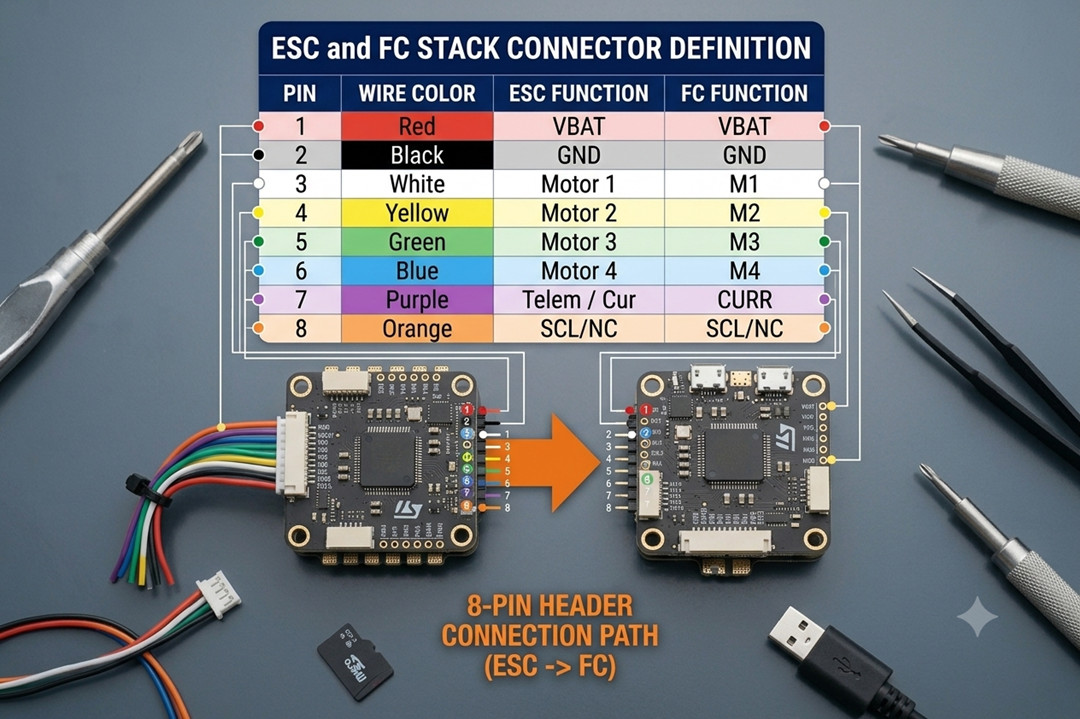
3. Connect plug to plug. If both boards have headers, just connect the cable. If your FC uses solder pads, strip and solder each wire according to the pinout.
4. Secure the stack. Mount the FC on top of the ESC using the provided nylon standoffs. Do not overtighten—you want the boards to sit firmly without bending.
5. Connect the battery lead. Solder your XT60 (or other connector) to the ESC’s BAT+ and BAT- pads.
Test. Power on the FC via USB first (no battery) to see if it connects to your computer. Then disconnect USB, plug in the battery, and check for magic smoke. If everything stays cool, you’re good.
Common mistake: Connecting the ribbon cable backwards or offset by one pin. Most connectors are keyed, but not all. When in doubt, trace each wire with a multimeter.
How to Calibrate Flight Controller (Accelerometer)
Calibrating the accelerometer tells the FC which way is level. Do this after every new build, after a crash, or if the drone drifts in angle/horizon mode.
Step‑by‑step (Betaflight):
1. Place your drone on a perfectly level surface. A spirit level helps, but a known‑flat table is usually fine.
2. Connect the FC to your computer via USB. Open Betaflight Configurator.
3. Click the “Setup” tab. You’ll see a 3D model of your drone. If it’s not level on screen, proceed.
4. Click the “Calibrate Accelerometer” button. Wait 2–3 seconds. The model should snap to level.
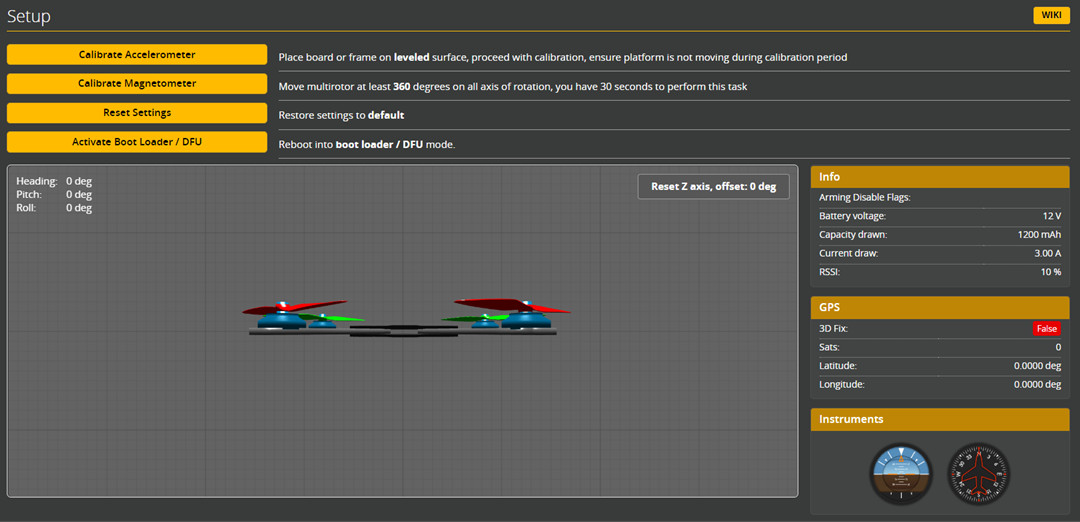
Image source: betaflight.com
Optional but recommended: Tilt the drone forward, right, etc., and watch the 3D model move accordingly. If it moves correctly, calibration succeeded.
Step‑by‑step (ArduPilot / Mission Planner):
1. Place the drone level.
2. Connect via USB. Open Mission Planner.
3. Go to Setup → Mandatory Hardware → Accelerometer Calibration.
4. Click “Calibrate Accelerometer” and follow the on‑screen instructions. You’ll be asked to place the drone in six different orientations (level, left side down, right side down, nose down, nose up, upside down). Click “OK” after each position.
5. Wait for completion. This takes about 30 seconds.
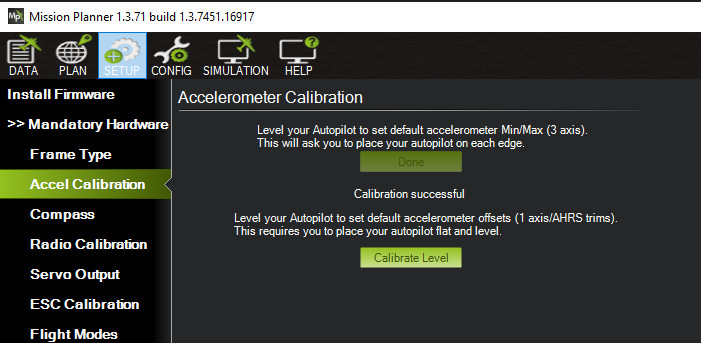
Image source: ardupilot.org
What if it still drifts after calibration? Check your radio’s stick trims (they should be centered). Also check for vibrations — a badly balanced prop can confuse the accelerometer.
How to Calibrate Flight Controller (ESC Calibration)
ESC calibration ensures all motors spin at the same speed for the same throttle input. Most modern ESCs that support DShot do not need calibration. If your ESC uses PWM, OneShot, or Multishot, calibrate them.
WARNING: Remove propellers before doing this. Motors will spin at full speed.
Step‑by‑step (Betaflight):
1. Connect the FC to Betaflight. Go to the “Motors” tab.
2. Check the box that says “I understand the risks” (or similar). This enables motor control.
3. Move the master throttle slider all the way to the top (maximum). You’ll hear the ESCs make a continuous tone.
4. Plug in the battery (not USB only — the battery must power the FC to send high signals to ESCs). The ESCs will beep a different pattern.
5. Move the master slider to the bottom (minimum). The ESCs will beep again to confirm calibration.
6. Disconnect the battery, then reconnect. Your ESCs are now calibrated.
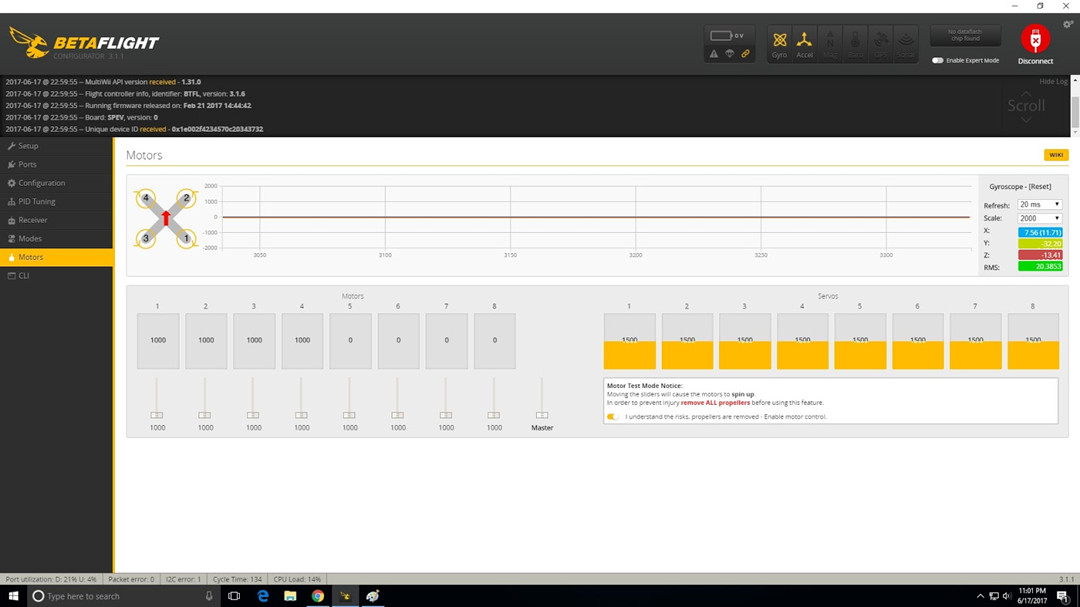
Image source: betaflight.com
For ArduPilot: Use Mission Planner’s ESC Calibration wizard under Setup → Optional Hardware → ESC Calibration.
If calibration doesn’t work: Check that your ESC protocol is set correctly (PWM, Oneshot125, etc.) in the Configuration tab. DShot does not require calibration.
How to Mount the Flight Controller
Proper mounting is critical. A poorly mounted FC vibrates, which confuses the gyro and causes hot motors, mid‑throttle oscillations, and drifting.
What you need: Silicone grommets, rubber standoffs, or soft mounting “O‑rings.” Nylon screws (metal screws can short out pads).
Step‑by‑step:
1. Identify the mounting pattern. Most FCs use 30.5×30.5mm, 20×20mm, or 25.5×25.5mm. Your frame should have matching holes.
2. Install soft mounts. Place silicone grommets or rubber bobbins between the FC and the standoffs. Many frames include them. If not, buy a pack of M3 silicone vibration dampers.
3. Orientation matters. The arrow on the FC must point toward the front of the drone. If you mount it sideways or backwards, you’ll have to remap the gyro orientation in software.
4. Secure with nylon screws. Push the screws through the soft mounts and into the standoffs. Tighten until snug—not tight. Overtightening compresses the soft mounts and defeats their purpose.
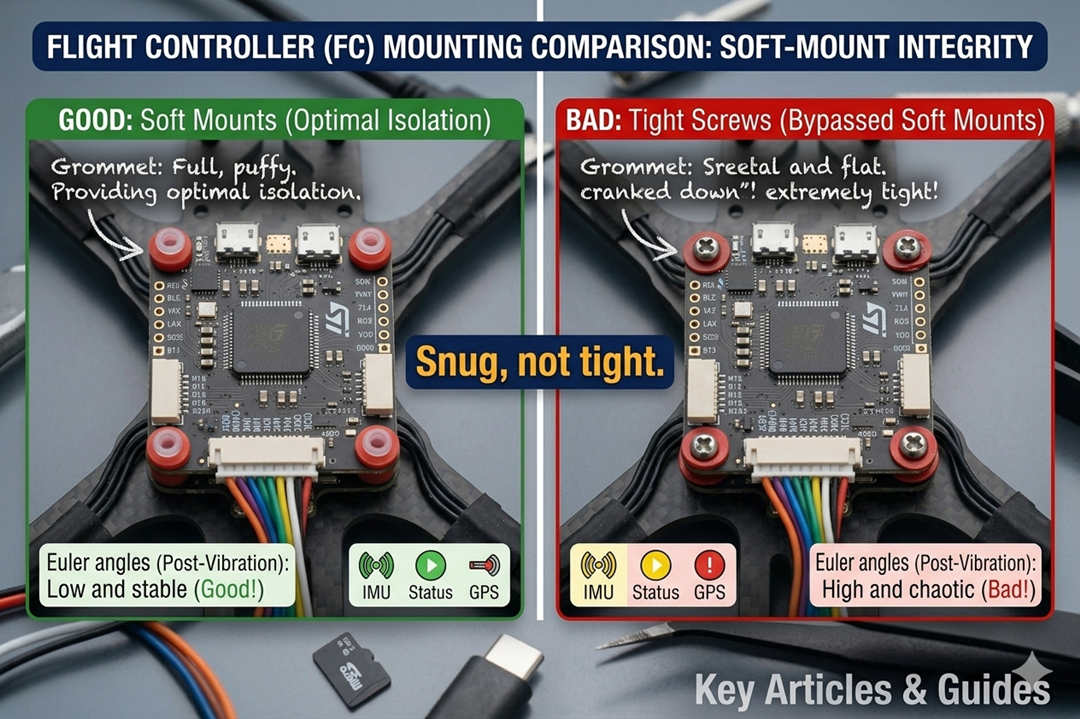
5. Check clearance. Ensure no wires are pinched under the FC and that the USB port is accessible.
Pro tip: Some builders “hard mount” (directly screw the FC into metal standoffs) on very rigid frames. This can work if the frame absorbs vibrations well. For most builds, soft mount.
How to Connect the Flight Controller to the Receiver
Your receiver (the thing that gets signals from your radio transmitter) connects to the FC via a UART. Here’s how.
For SBUS / FPort receivers (most common):
1. Identify the correct pads. On the FC, look for “RX” pads. You’ll connect the receiver’s signal wire to an RX pad. Common choices: RX1, RX2, RX3, or a pad specifically labeled “SBUS”.
2. Power the receiver. Most receivers need 5V and GND. Connect these to any 5V and GND pad on the FC.
3. Wire it up: Receiver “GND” → FC “GND”. Receiver “5V” → FC “5V”. Receiver “SIGNAL” (or “SBUS”) → FC “RX” pad (e.g., RX3).
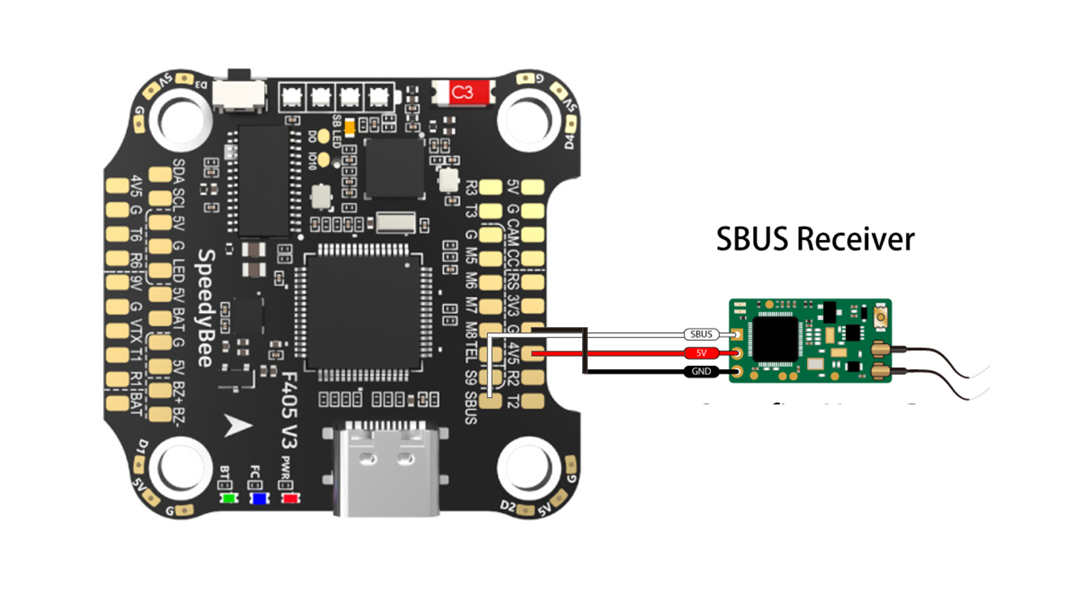
Image source: speedybee.zendesk.com
4. Configure Betaflight: In the Ports tab, find the UART you used (e.g., UART3). Turn on “Serial RX” for that UART. Click Save.
5. Configure Receiver tab: Go to the Receiver tab. Set “Receiver Mode” to “Serial‑based receiver”. Set “Serial Receiver Provider” to “SBUS” (for FrSky) or “CRSF” (for Crossfire/ELRS). Save.
For CRSF (Crossfire / ExpressLRS): Same wiring, but you may also need to connect the receiver’s TX pad to an FC RX pad (for telemetry). Most ELRS receivers use a single UART for both RX and TX — connect as above.
Testing: Power the drone via USB. Turn on your radio. In Betaflight’s Receiver tab, move the sticks. You should see colored bars moving.
How to Connect Servo to Flight Controller (Fixed-Wing / VTOL)
If you’re building a fixed‑wing, a VTOL (like JOUAV’s CW series), or a drone with a drop mechanism, you’ll need to connect servos.
Step‑by‑step:
1. Identify PWM output pads. On most FCs, these are labeled M5, M6, M7, M8, or “SERVO1, SERVO2”. They output standard PWM signals.
2. Power the servo. Servos draw more current than the FC's 5V rail can provide. Connect the servo’s red and black wires to a separate BEC (battery elimination circuit) — either a standalone BEC or the BEC output from your PDB/ESC. Typically, 5V or 6V, depending on the servo.
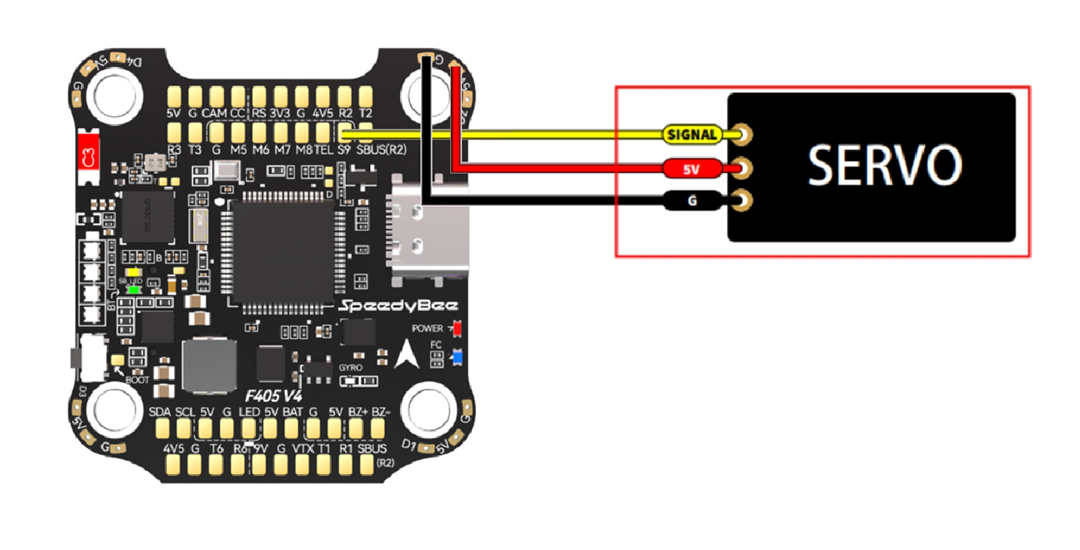
Image source: speedybee.zendesk.com
3. Connect the signal wire. The servo signal wire (usually white or yellow) goes to the PWM pad on the FC.
4. Configure in software:
- Betaflight / INAV: Go to the Servos tab. Assign the servo to a channel (e.g., channel 5 on your radio). Set the output range (usually 1000–2000 µs).
- ArduPilot: Use Mission Planner’s Servo Output panel. Assign a servo function (e.g., aileron, elevator, drop) and set PWM mins/maxs.
5. Test. Power the system (battery, not just USB — servos need 5V). Move the assigned stick or switch. The servo should move smoothly.
Warning: Do not connect a servo directly to an FC’s 5V pad if the servo draws more than 500 mA. Many servos will brown out the FC, causing a crash.
How to Flash Flight Controller (Firmware Update)
Flashing updates the flight controller’s operating system—Betaflight, INAV, ArduPilot, or PX4. You’ll do this when you first get the board (to ensure the latest features) or when a new version fixes a bug.
Step‑by‑step (Betaflight):
1. Download the correct firmware target. Go to the Betaflight Configurator Firmware Flasher tab. In the “Firmware” dropdown, select your FC’s target (e.g., “FOXEERF722V4”). If unsure, run the version command in CLI or check the manufacturer’s website.
2. Put the FC into DFU mode. Most FCs enter DFU (device firmware upgrade) mode automatically when you plug in USB. If not:
- Hold the BOOT button (a small physical button on the FC).
- While holding, plug in USB.
- Release the button after 2 seconds. The FC should appear as “STM32 BOOTLOADER” or similar in Windows Device Manager.
3. Select the firmware version. Choose the latest stable release (e.g., 4.5.1). Leave “Full chip erase” checked.
4. Flash. Click “Load Firmware [Online]” (it will download), then “Flash Firmware”. Wait 30–60 seconds.
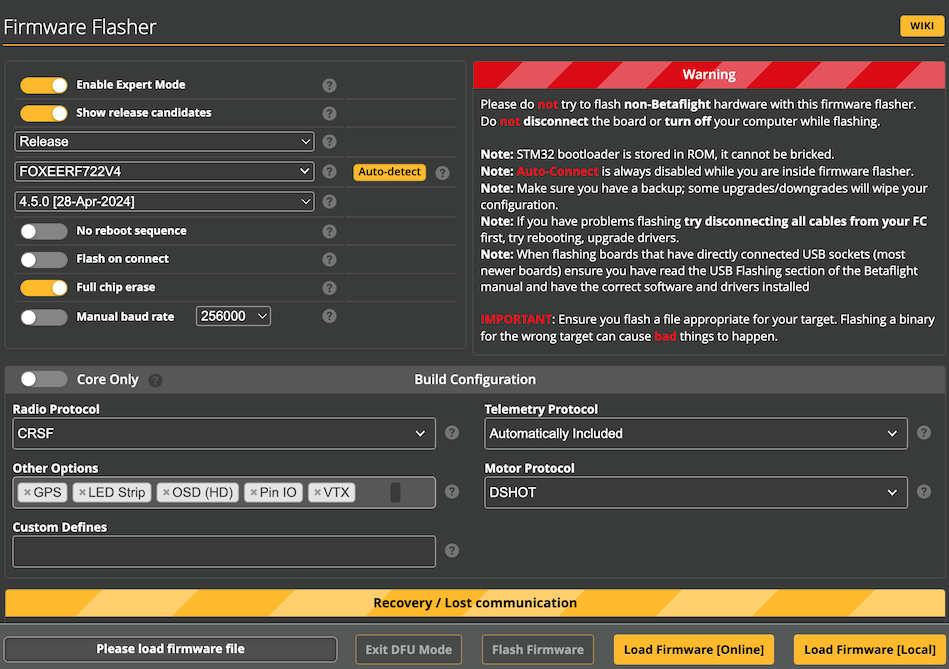
Image source: betaflight.com
5. Reconnect. After flashing, disconnect USB and reconnect. Go to the Setup tab. You should see the Betaflight version updated.
Step‑by‑step (ArduPilot / Mission Planner):
1. Open Mission Planner. Go to Initial Setup → Install Firmware.
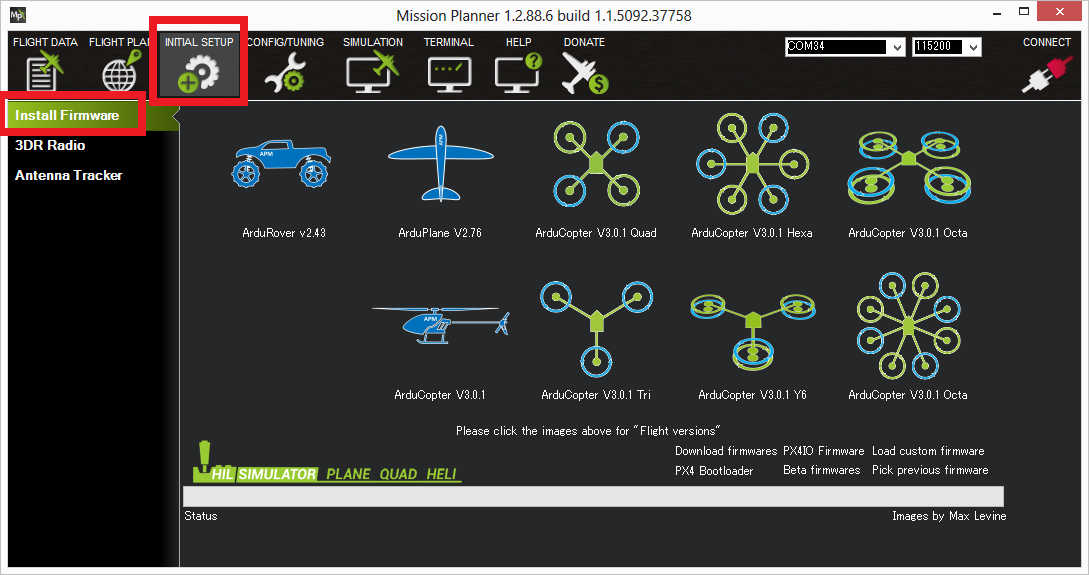
2. Select your FC type (e.g., “Pixhawk 1”, “Cube Orange”, “Matek F405‑Wing”). Mission Planner will download the appropriate .apj file.
3. Put your FC into bootloader mode (similar DFU or press the BOOT button).
4. Click “Upload Firmware”. Wait. The FC will reboot automatically.
Troubleshooting:
- DFU not detected (Windows): Install the ImpulseRC Driver Fixer or Zadig to replace the STM32 bootloader driver.
- Flash fails mid‑way: Try a different USB cable (data‑capable, not charge‑only). Short cables work best.
How to Program a Flight Controller (What “Programming” Actually Means)
Most people mean configuring rather than writing code. Here’s what each term covers.
Configuring (what 99% of users do):
- Adjusting PID values
- Changing rates and expo
- Setting up modes (arm, angle, horizon, etc.)
- Configuring ports for receivers and peripherals
- Setting up OSD elements
You do all of this through Betaflight Configurator, INAV Configurator, or Mission Planner’s graphical interfaces. No coding required.
Advanced configuring (CLI commands): In Betaflight, go to the CLI tab. You can type commands like set motor_pwm_protocol = DSHOT600, set gyro_lpf1_type = PT1, or diff all to see your configuration. This is still not programming — it’s setting parameters.
Real programming (writing code): If you want to modify the firmware itself (e.g., add custom logic for a research project), you need to:
- Fork the Betaflight, INAV, or ArduPilot GitHub repository.
- Set up a development environment (STM32CubeIDE, VS Code with PlatformIO).
- Write C/C++ code.
- Compile the firmware into a .hex file.
- Flash that custom firmware onto your FC.
This is advanced work for embedded software engineers. For almost everyone, the graphical configurators are sufficient.
How to Find Flight Controller Serial Number (SN)
Some firmware activations or warranty claims require the FC’s serial number.
Where to look:
1. On the board itself: Most FCs have a QR code sticker on the bottom or top of the PCB. The SN is printed nearby. Look for an 8–16 digit alphanumeric string.
2. On the packaging: The original box often has a label with the SN.
3. Via Betaflight CLI (some FCs): Connect to Betaflight, open the CLI, and type get serial_number. Not all boards support this command. If it returns "unknown", the SN is not stored in firmware.
4. On the manufacturer’s configuration software: Some brands (e.g., SpeedyBee) show the SN in their mobile app when connected via Bluetooth.
If you can’t find it: For most hobbyist FCs, the SN is only needed for warranty claims. Contact the retailer with proof of purchase — they often have records.
How to Turn On the Xbox Controller for Flight Simulator
Want to practice flying without crashing real drones? Use a flight sim. An Xbox controller works great for getting started.
Step‑by‑step (Windows):
1. Connect the Xbox controller:
- Wired: Plug in via USB‑C or micro‑USB. Windows will install drivers automatically.
- Wireless (Bluetooth): Go to Windows Settings → Bluetooth & devices → Add device → Bluetooth. Press the Xbox controller’s pairing button (top edge). Select “Xbox Wireless Controller”.
2. Open your flight simulator. Popular options: Liftoff, VelociDrone, Uncrashed, TrypFPV, DRL Sim.
3. Go to controller settings. Usually under Options → Input or Controller Configuration.
4. Select “Xbox Controller” from the device list.
5. Map the axes (if not auto‑detected):
- Left stick up/down = Throttle (or Pitch)
- Left stick left/right = Yaw (or Roll — depends on mode)
- Right stick up/down = Pitch
- Right stick left/right = Roll
- Triggers = could be camera angle or throttle (optional)
- Calibrate in the sim’s calibration tool. Move each stick to full travel and center.
- Test fly. If the drone drifts, adjust deadband settings in the sim.
Best controllers for drone sims: Xbox (any), PlayStation 4/5, or a dedicated RC transmitter with a USB dongle (e.g., Radiomaster Zorro, FrSky Taranis). The Xbox is cheap and accessible — great for beginners.
How to Connect Controller to Flight Simulator (General)
Same process as above, but for any gamepad or RC transmitter:
For USB gamepads (Logitech, PS, Nintendo, etc.):
- Plug in USB. Windows recognizes it as a generic game controller.
- Open your sim. Go to Input settings.
- Select the controller from the dropdown.
- Manually map axes and buttons (most sims have a “learn” or “auto‑detect” wizard).
For RC transmitters (FrSky, Radiomaster, Spektrum):
- Most require a USB dongle (e.g., FrSky XSR‑SIM) or direct USB‑C connection (newer radios like the Radiomaster Boxer).
- Connect the transmitter to the PC via USB (select “Joystick” or “HID” mode on the radio).
- The transmitter appears as a game controller in Windows.
- Calibrate in the sim.
Pro tip: For muscle memory, flying a sim with your actual RC transmitter is better than an Xbox controller — the stick feel is identical. But the Xbox is fine for learning basic orientation and throttle control.
Summary — Getting Your FC Ready to Fly
You’ve connected the ESC, calibrated the sensors, mounted the board, wired the receiver, flashed fresh firmware, and set up your simulator controller. That’s the heavy lifting.
If you’re building a drone for the first time, take it slow. Do one step, test, then move to the next. A methodical build is a successful build.
FAQ
Which flight controller is best for a quadcopter?
For 90% of FPV freestyle and racing pilots: SpeedyBee F405 V4 stack. It’s affordable ($65–75), has Bluetooth for phone configuration, and uses the F405 chip with 1MB flash (more than many F7 boards).
- For long-range with GPS: Holybro Kakute H7 v1.3 or SpeedyBee F7 V3.
- For commercial/industrial: Holybro Pixhawk 6X or Cube Orange+.
What’s the cheapest flight controller for a drone?
A $15 brushed AIO board (obsolete) or a $20 generic F4 from AliExpress. But expect poor documentation and possible quality issues. For a reliable budget option, the SpeedyBee F405 Mini at $60 is the lowest I’d recommend for a first build.
Can you play Flight Simulator with a controller?
Yes. Xbox, PlayStation, and most USB gamepads work with drone simulators (Liftoff, VelociDrone, Uncrashed, TrypFPV) and with Microsoft Flight Simulator. You just plug it in, map the axes in the sim’s settings, and fly.
For the best muscle memory transfer, use your actual RC transmitter with a USB dongle. But an Xbox controller is fine for beginners.
What is an APM flight controller?
APM (ArduPilot Mega) is an old open-source autopilot board based on Arduino Mega. It runs ArduPilot firmware and can do GPS waypoint missions. It’s been largely replaced by Pixhawk (faster processors, more sensors). You’ll still see APM 2.8 clones for under $30, but they’re not recommended for new builds.
How to become a flight controller (human, not hardware)?
This is a different career entirely. Human flight controllers work at NASA, ESA, or SpaceX—they monitor spacecraft from mission control. The path:
1. Bachelor’s degree in aerospace, mechanical, or electrical engineering.
2. Internships at space agencies or commercial space companies.
3. Apply for flight controller positions (e.g., NASA’s Flight Controller training program).
This has nothing to do with drone flight controllers. If you meant “how to become a drone pilot” — study for the FAA Part 107 exam (US) or your local equivalent.
Is a flight controller the same as an ESC?
No. The flight controller is the brain (processes data, makes decisions). The ESC (Electronic Speed Controller) is the muscle—it takes commands from the FC and spins the motor. You need both. Many stacks combine them into one board (AIO), but they are separate functions.
What does “AIO” mean on a flight controller?
AIO = All‑In‑One. It means the flight controller, ESC, and sometimes the receiver and VTX are all on a single circuit board. Common in Tiny Whoops and micro drones to save weight. The trade‑off: if one part fails, you replace the whole board.
How do I know if my flight controller has a barometer?
Check the specs. If it lists “BMP280”, “BMP388”, “DPS310”, or “barometer” in the features, it has one. You can also connect to Betaflight, go to the Setup tab, and look for an altitude reading (it will be zero on the bench, but the sensor is present). Without a barometer, altitude hold and GPS rescue won’t work well.
Can I use an F4 flight controller for a 7‑inch long‑range drone?
You can, but an F7 is better. A 7‑inch long‑range build often has GPS, telemetry, and multiple peripherals. F4 boards have fewer UARTs, so you might run out of ports. F7 gives you breathing room. Also, many F4 boards lack a barometer — check before buying.